




Florida's 3.5 million small businesses employ 3.8 million people, and many of them run daily operations on mobile phone lines rather than desk phones. This article explains what the Figgers Business Plans page lists, how a multi line wireless account is set up, ported and managed, which Figgers devices suit field crews and back offices, and how a Florida owner can evaluate the offering line by line, with no annual contract to sign.
A roofing crew in Polk County, a pool route in Broward County and a food truck outside a Tampa brewery share one trait: the business phone is a mobile phone, and there is usually more than one. As a company grows from the owner's handset to a handful of lines, new questions arrive. Who owns the numbers? What happens to a line when a worker leaves? Who sees the bill? Figgers Communication Inc., headquartered in Fort Lauderdale, offers Business Plans for companies at this stage, with no annual contract, a Figgers Business Expert who follows up within 24 hours, and a Corporate Portal for account management and bill payment.
Florida's economy runs on small businesses, and small businesses run on mobile lines
According to the U.S. Small Business Administration Office of Advocacy's 2025 Florida profile, the state has 3.5 million small businesses, 99.8 percent of all Florida businesses, employing 3.8 million people, or 39.6 percent of Florida employees. Construction stands out: small employers make up 99.6 percent of the state's construction employers and provide 431,654 jobs, 82.5 percent of the industry's total. Small employers in accommodation and food services add 563,099 jobs, many tied to tourism; Visit Florida's preliminary estimate puts 2025 visitation at a record 143.3 million.
Mobile lines run through every one of those categories. Construction and roofing crews across Central Florida work from trucks. Landscapers and pool service companies in Broward, Miami Dade and Palm Beach counties dispatch routes by text. Marine services along Fort Lauderdale's waterways coordinate from the dock. Home health agencies schedule aides between client visits. Restaurants and food trucks in Tampa and Orlando take supplier calls on handsets. Growers in Heartland counties such as Hendry, Highlands and Okeechobee manage crews spread across groves. Real estate teams work between showings. Seasonal tourism operators in the Keys and along the Gulf Coast staff up for winter and scale back in summer, which makes a twelve month contract a poor fit. For all of them, the wireless account is operating infrastructure.
What the Figgers Business Plans page lists
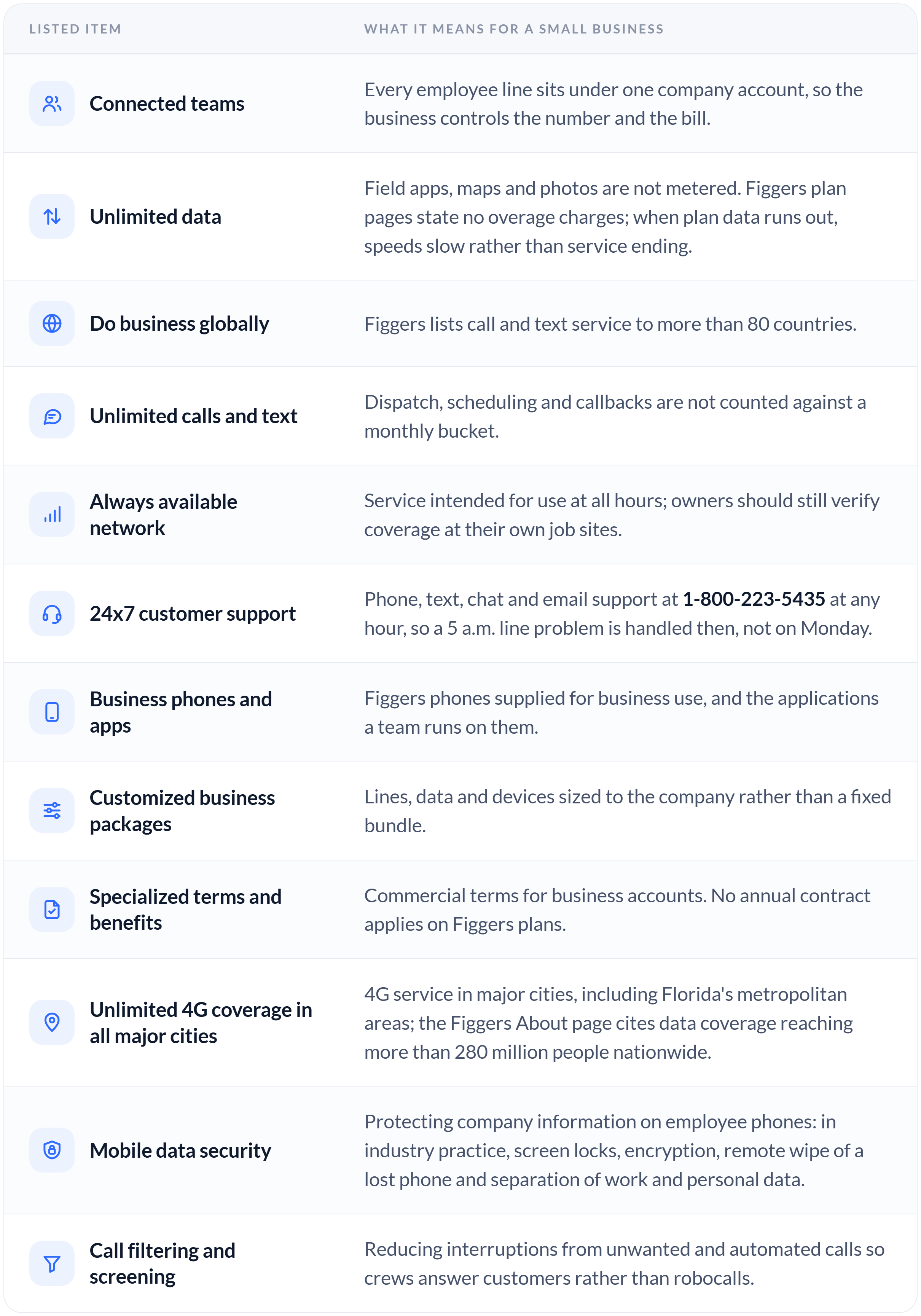
Twelve items appear on the page at figgers.com/business-plans.. The table translates each into operational terms using general industry definitions; the Figgers Business Expert is the source for the details of any specific package.
How a multi line account is set up, step by step
Behind those items is a sequence any owner should understand before adding lines.
The account. One business account holds every line under one bill, with an authorized contact who can add or reassign lines. At Figgers, account management and bill payment run through the Corporate Portal at figgers.com/corporate.
The SIM. Each line is a subscriber identity on a physical SIM or an eSIM profile. Figgers mails a three in one SIM card kit and offers eSIM activation; confirm eSIM device compatibility with Figgers support before ordering. A $4.99 per SIM card charge is noted at checkout on the switch page.
The number. A line receives a new number, or an existing business number is ported in. Porting requires the current provider account number, the transfer PIN or account password, the last four digits of the account holder's Social Security number, the device IMEI or serial number, the billing ZIP code and a shipping address. Figgers states it plainly: do not cancel the existing account until the Figgers account has been activated.
The device. Company owned Figgers devices arrive ready for the plan, or a worker's unlocked, compatible phone comes under the account through figgers.com/bring-your-own-device.
Each SIM is activated at figgers.com/activate, which ties the line to the account and its plan; the switch page states that a new SIM arrives from Figgers within 24 hours.
The network. Once active, the handset registers on the network and connects to the strongest available signal as the worker moves between sites.
Getting started and managing the account
The entry point is a short form on figgers.com/business-plans asking for the company name, the requester's title, the number of employees, the type of provider used today, the number of lines needed (from 1 to 12 or more) and current monthly spend. Figgers states that a Figgers Business Expert will contact the business within 24 hours. Owners who prefer to talk first can call 1-800-223-5435.
Once lines are live, the Corporate Portal handles account management and bill payment: one login, one bill, one view of every line. Companies moving many numbers should coordinate the porting schedule with the Business Expert so that lines move in groups and no crew loses service on the same day.
Devices for crews, counters and back offices
For field crews, the DragonX phone pairs a 6.53 inch display with features suited to work outside an office. Its dual SIM design lets a worker carry a personal number and a business number in one phone, so the company line stays with the job. Push to Talk, a walkie talkie style voice feature, is built in, and a customizable shortcut key can be assigned to it or to another app. The phone carries a 4150mAh battery. Its emergency call feature captures photos and audio and sends a text message to up to four designated people; because it must be set up in advance, it belongs on the onboarding checklist.
At a counter or in a back office, the F-Tab tablet and the F-in-1 desktop include built in LTE, so point of sale, dispatch and accounting applications keep running on cellular data when storefront Wi-Fi fails. The F-Tab was covered in an earlier newsroom article linked below.
Figgers Device Protection, listed at $8.99 per month on figgers.com, covers new or used devices, including phones employees bring, with unlimited claims and phone repairs often completed the same day. Buy Now, Pay Later is listed on figgers.com with zero upfront, so a company can outfit a new crew at the start of a season without a capital purchase.
A six step evaluation framework for Florida owners
Count lines and data needs. List every person who needs a number, then separate voice heavy roles such as dispatch from data heavy roles such as photo documentation and navigation.
Check coverage by address. Enter job site, route and yard addresses at figgers.com/add-new-line, not just the office. A Heartland grove and a Keys marina each deserve their own check.
Decide which numbers must port. Numbers printed on trucks, signs and invoices should move; numbers nobody calls can be retired.
Set the device policy. Company owned devices simplify security and replacement; bring your own device lowers upfront cost but requires unlocked, compatible phones and a written rule on who owns each number.
Set a protection policy. Decide whether every field phone carries Device Protection and who files the claim when a phone goes into a pool or off a roof.
Plan for storm season. Decide in advance how crews check in, which lines are essential and how the company reaches customers after a hurricane. Storm restoration is covered in a separate newsroom article linked below.
Business continuity in a seasonal state
Florida's seasonal economy argues for wireless terms that flex. A Keys charter operator that runs eight lines from December through April does not need eight in September, and a contract that locks them in for a year charges for idle capacity. With no annual contract on Figgers plans, a company can add lines ahead of a season without committing to twelve months of service. Around the clock support matters for the same reason: a seasonal business cannot wait for office hours when a line fails during its busiest week.
What Florida readers should do next
Work through the six step framework and run the coverage check for every work address. Then submit the form at figgers.com/business-plans or call 1-800-223-5435, and ask the Figgers Business Expert about packages, data handling, porting timelines and device options. Gather porting details for every line before that conversation, and keep existing service active until each Figgers line is confirmed live.
About Figgers Communication Inc.
Figgers Communication Inc. is an American telecommunications company and device manufacturer headquartered in Fort Lauderdale, Florida. Founded by Freddie Figgers, the company provides cellular, mobile broadband, home phone and international calling services without an annual contract, and designs its own phones, tablets, laptops and connected hardware. Figgers customer support is available 24 hours a day, 7 days a week by phone, text and email at 1-800-223-5435 and Customer.Service@Figgers.com, and by live chat at www.figgers.com.